Kea DHCP
Kea lease allocation, client classification and option assignment
Carsten Strotmann and the ISC Kea Team
Created: 2025-11-27 Thu 07:41
In this Chapter
- Lease allocation
- Client classification
- DHCP options
- DHCP reservations
- Shared subnets
- Questions & Answers
DHCP options
DHCP options
- DHCP options can be configured in different scopes in the Kea
configuration
- Global
- Class
- Subnet
- Pools
- Reservations
Global DHCP options (1/2)
"Dhcp4": {
    "option-data": [{
	   "name": "domain-name-servers",
	   "code": 6,
	   "space": "dhcp4",
	   "csv-format": true,
	   "data": "192.0.2.1, 192.0.2.2"
	},
	...
    ]}
Global DHCP options (2/2)
- If the default values are used, the fields
code,spaceandcsv-formatcan be omitted
"Dhcp4": {
    "option-data": [{
           "name": "domain-name-servers",
           "data": "192.0.2.1, 192.0.2.2"
        },
        ...
    ]}
Subnet specific DHCP option
[...]
   "subnet4": [ {
            "subnet": "192.0.2.0/24",
            "pools": [ { "pool": "192.0.2.100 - 192.0.2.200" } ],
            "option-data": [{
                    "name": "routers",
                    "data": "192.0.2.1" },
                {
                    "name": "domain-name",
                    "data": "a.example.com" }
            ]},
[...]
Client class options
"client-classes": [{
        "name": "Zimbutsio-Server",
        "test": "option[vendor-class-identifier].text == 'Zimbutsio'",
        "option-data": [ {
                "name": "log-servers",
                "data": "192.0.2.42"
            }]
    }],
[...]
Defining custom DHCPv4 options (1/2)
- Sometimes it is required to define custom DHCP options that are not
part of the DHCP standards.
- These can be vendor specific options, or new DHCP options that are not yet implemented in Kea DHCP
Defining custom DHCPv4 options (2/2)
{
    "Dhcp4": {
        "option-def": [{
                "name": "my-message",
                "code": 234,
                "type": "string",
                "array": false,
                "record-types": "",
                "space": "dhcp4",
                "encapsulate": "" }],
        "option-data": [{
                "name": "my-message",
                "space": "dhcp4",
                "csv-format": true,
                "data": "Hello World" }],
[...]
Option assignment order
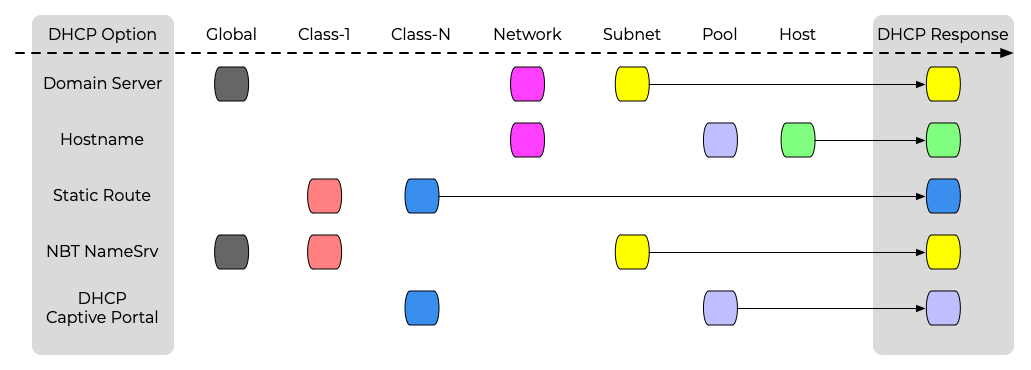
(Client-class options are assigned in the order in which the client classes are evaluated (specified in the configuration) )
DHCP reservations
Why DHCP reservations
- Security policies
- Stable addressing (server)
- IP bound licenses
- Captive portal (KNOWN vs. UNKNOWN clients)
DHCP reservations
- Kea DHCP supports reservations of client leases based on
- Hardware interface address (MAC-Address)
- DHCP Unique ID (DUID)
- Relay-Circut-ID (DHCPv4)
- Client-ID / Hostname (DHCPv4)
- flex.id
DHCP reservation parameter
- Alongside IP-Address leases, reservations can also reserve a number
of DHCP parameters for a client
- Hostname
- DHCP options
- Reservation-client-classes
- Boot-file-name (BOOTP/DHCPv4)
- Next-server (BOOTP/DHCPv4)
- Server-hostname (BOOTP/DHCPv4)
Global vs. Subnet reservations
- DHCP reservations can optionally be defined on a global scope
- Global reservations can be used to assign a fixed hostname or other options to a client
- Kea does not prevent the definition of DHCP parameters on the global level that are only useful in an subnet scope (like IP address or IPv4 default route). Be careful!
- The common case is to have reservations in the subnet or
shared-subnet scope
- Kea 1.9+ does allow for reservations to be defined on a global and subnet level (at the same time)
Example of global reservation
"Dhcp4:" {
    # This specifies global reservations. They will apply to all subnets that
    # have global reservations enabled.

    "reservations": [
    {  "hw-address": "aa:bb:cc:dd:ee:ff",  "hostname": "hw-host-dynamic"  },
    {  "hw-address": "01:02:03:04:05:06",  "hostname": "hw-host-fixed",  "ip-address": "192.0.1.77"  }, # risky!
    {  "circuit-id": "'office042'",        "hostname": "circuit-id-host"  },
[...]
in-pool vs out-of-pool reservations
- Host reservations can be inside a dynamic DHCP pool or outside a dynamic DHCP pool
- Reservations that are inside a pool can lead to DHCP conflicts and also might result in a performance loss (see DHCP tuning)
Dynamically manage DHCP reservations
- Small Kea deployments (small = a few hundred client machines) can have the DHCP reservations inside the Kea configuration file
- Larger deployments might want to change the DHCP reservations
dynamically and programatically via the API
- The Host Commands hook adds a number of new commands to Kea used to query and manipulate host reservations
Dynamically manage DHCP reservations
- The Host Commands hook requires a database for storing the host reservations
- If reservations are specified in both file and database, file reservations take precedence over the ones in the database.
Host Commands
| Command | Description |
|---|---|
| reservation-add | add a new reservation to the Kea DB |
| reservation-get-all | get all reservation information (can be huge) |
| reservation-get | get information on a single reservation (by address or identifier) |
| reservation-get-page | get all reservation information from a subnet by pages (used for GUI display) |
| reservation-get-by-hostname | get the reservation information for one host by its hostname |
| reservation-get-by-id | get the reservation information for one host by its identifier (global, since 1.9.0) |
| reservation-del | delete a reservation from the database |
Example command file to add a reservation (1/2)
- This command snippet can be used to create a new reservation inside the Kea Host database
$ cat reservation-add.json
{
  "command": "reservation-add",
  "service": [ "dhcp6" ],
  "arguments": {
    "reservation": {
      "duid": "01:02:03:04:05:06:07:08:09:0A",
      "hostname": "foo.example.com",
      "ip-addresses": [ "2001:db8:1::1" ],
      "option-data": [{
          "data": "4491",
          "name": "vendor-opts"
        },{
          "data": "3000:1::234",
          "name": "tftp-servers",
          "space": "vendor-4491"
        }],
      "subnet-id": 1
    }
  }
}
Example command file to add a reservation (2/2)
- The
curlcommand can be used to send the request towards the Kea API
$ curl -s -X POST -H "Content-Type: application/json" \
  -d @reservation-add.json http://127.0.0.1:8000/ | jq
[
  {
    "result": 0,
    "text": "Host added."
  }
]
Example command file retrieving all reservations
- This command snippet can be used to retrieve all reservations from the Kea Host database
$ cat reservation-get-all.json
{
  "service": [
    "dhcp6"
  ],
  "command": "reservation-get-all",
  "arguments": {
    "subnet-id": 1
  }
}
$ curl -s -X POST -H "Content-Type: application/json" \
  -d @reservation-get-all.json http://127.0.0.1:8000/ | jq
Client classing in reservations
- Clients can be associated to a client-class using a reservation (using the Hardware-Address, DUID, Client-ID, Relay-ID)
[...]
  "subnet4": [
  {
     "subnet": "10.0.0.0/24",
     "pools": [ { "pool": "10.0.0.10-10.0.0.200" } ],
     "reservations": [{
          "hw-address": "01:02:03:04:05:06",
          "client-classes": [ "windows", "staff" ]
      }]
  }],
[...]
Shared networks
Shared networks
- A shared subnet is a physical subnet with multiple IP networks
- One shared subnet definition can contain two or more subnet definitions
- Options can be defined on the shared-network, subnet and pool level
- Without client classification, Kea might choose an IP address from any pool of all subnets inside the shared network
When to use shared networks
- Shared Subnets are adding complexity to a DHCP server configuration
and should only be used if there is a good use case
- Shared subnet are sometimes created if a larger number of IP addresses are needed in a network, but because of IPv4 address shortage no continuous range of IPv4 addresses are available
- Another use case of shared subnets is a network where addresses from different IPv4 subnets (and possibly different network configuration) should be given to different network devices
Kea configuration shared network example
[...]
        "shared-networks": [
            {
                "name": "kea-lab01",
                "relay": { "ip-address": "192.0.2.1" },
                "subnet4": [{
                        "subnet": "192.0.2.0/24",
                        "option-data": [
                            { "name": "routers", "data": "192.0.2.1" }],
                        "pools": [{ "pool": "192.0.2.20 - 192.0.2.190" }]
                    }, {
                        "subnet": "10.0.0.0/24",
                        "option-data": [
                            { "name": "routers", "data": "10.0.0.1" }],
                        "pools": [{ "pool": "10.0.0.10 - 10.0.0.200"  }]
                    }]
	],
[...]
Client classification
DHCP client classes
- Kea DHCP can assign one or more client classes to client requests
- Depending on the client classes, different DHCP information can be
send to the client:
- DHCP-Options
- IP-Addresses
- BOOTP-Parameter inside DHCP responses
- Kea can select from multiple subnets / pools with the help of client classes
DHCP client classes
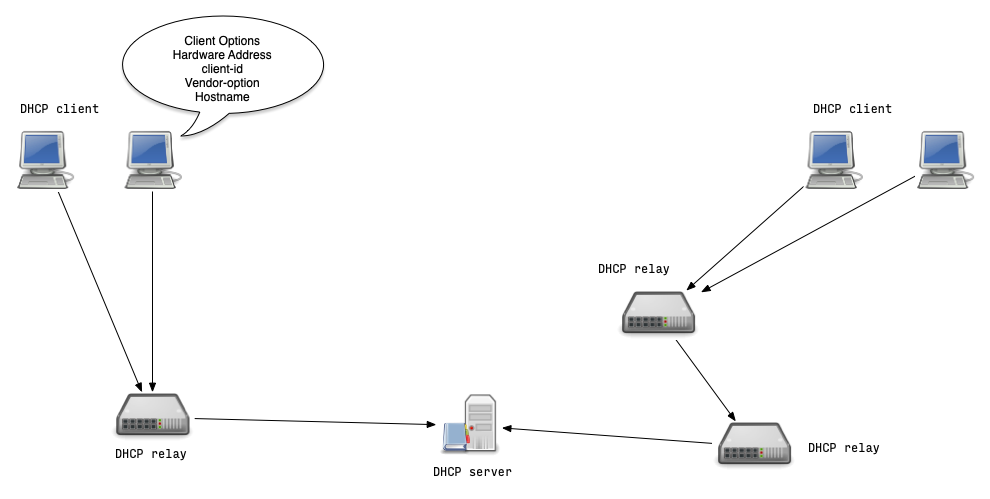
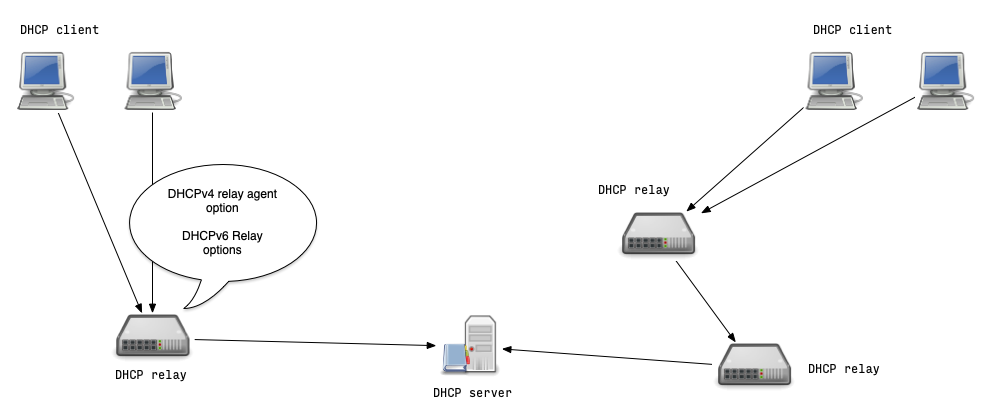
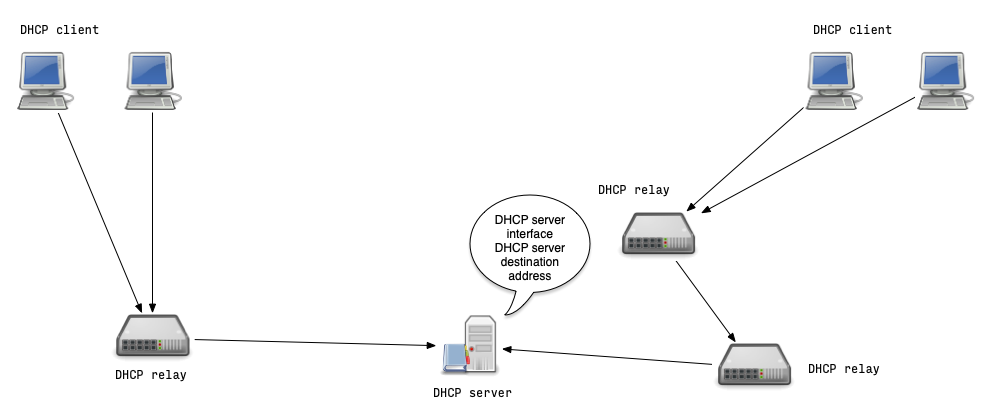
- Client classes can be built from various DHCP identifiers
- Information from the client host
- Information from the DHCP relay
- Information from the DHCP packet path towards the DHCP server
- Client classification examines the incoming DHCP packet's contents and selects one or more class(es) based on configuration criteria
Where do DHCP identifiers come from (1/4)
Where do DHCP identifiers come from (2/4)
Where do DHCP identifiers come from (3/4)
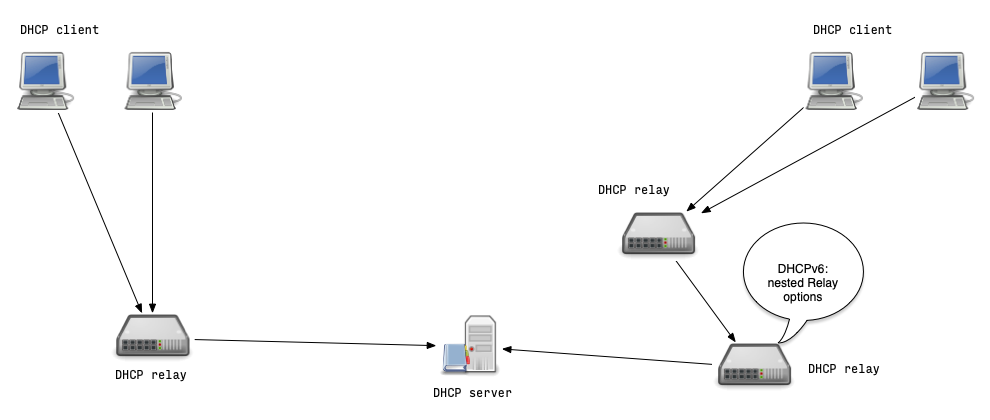
Where do DHCP identifiers come from (4/4)
Automatic vendor classing
- Kea DHCP automatically assigns a vendor client class if a vendor option (DHCPv4 option 60 or DHCPv6 option 16) is set in the DHCP request
- The content of that option is prepended with
VENDOR_CLASS_and the result is interpreted as a class- For example, modern cable modems send this option with value
docsis3.0, so the packet belongs to classVENDOR_CLASS_docsis3.0
- For example, modern cable modems send this option with value
Automatic vendor classing example
- Example subnet selection based on the vendor option
- A client must be in any of the client classes listed to get a lease from this subnet
- The vendor options used in this exercise are examples and not the real-world vendor option values:
  "shared-networks": [
     {
       "name": "kea-net01",
       "relay": { "ip-address": "192.0.2.1" },
       "subnet4": [
          {
            "subnet": "192.0.2.0/24",
            "client-classes": [ "VENDOR_CLASS_windowsCE" ], # <-- Windows CE Clients will get
   	                                                    # an IP from this subnet
            "option-data": [{ "name": "routers", "data": "192.0.2.1" }],
            "pools": [{ "pool": "192.0.2.60 - 192.0.2.220" }]
          },
          {
            "subnet": "10.0.0.0/24",
            "client-classes": [ "VENDOR_CLASS_fedoraLinux" ], # <-- Fedora-Linux Clients will
	                                                      # get an IP from this subnet
            "option-data": [
[...]
The KNOWN and UNKNOWN classes
- Kea automatically assigns classes based on host reservations
- All clients with a host reservation will be in the
KNOWNclass - All client without reservation will be in the
UNKNOWNclass
- All clients with a host reservation will be in the
- For example, these classes can be used to separate guests from staff clients
{
    "client-classes": [{
            "name": "dependent-class",
            "test": "member('KNOWN')",
            "only-if-required": true
    }]
}
Dynamic client classing based on expressions
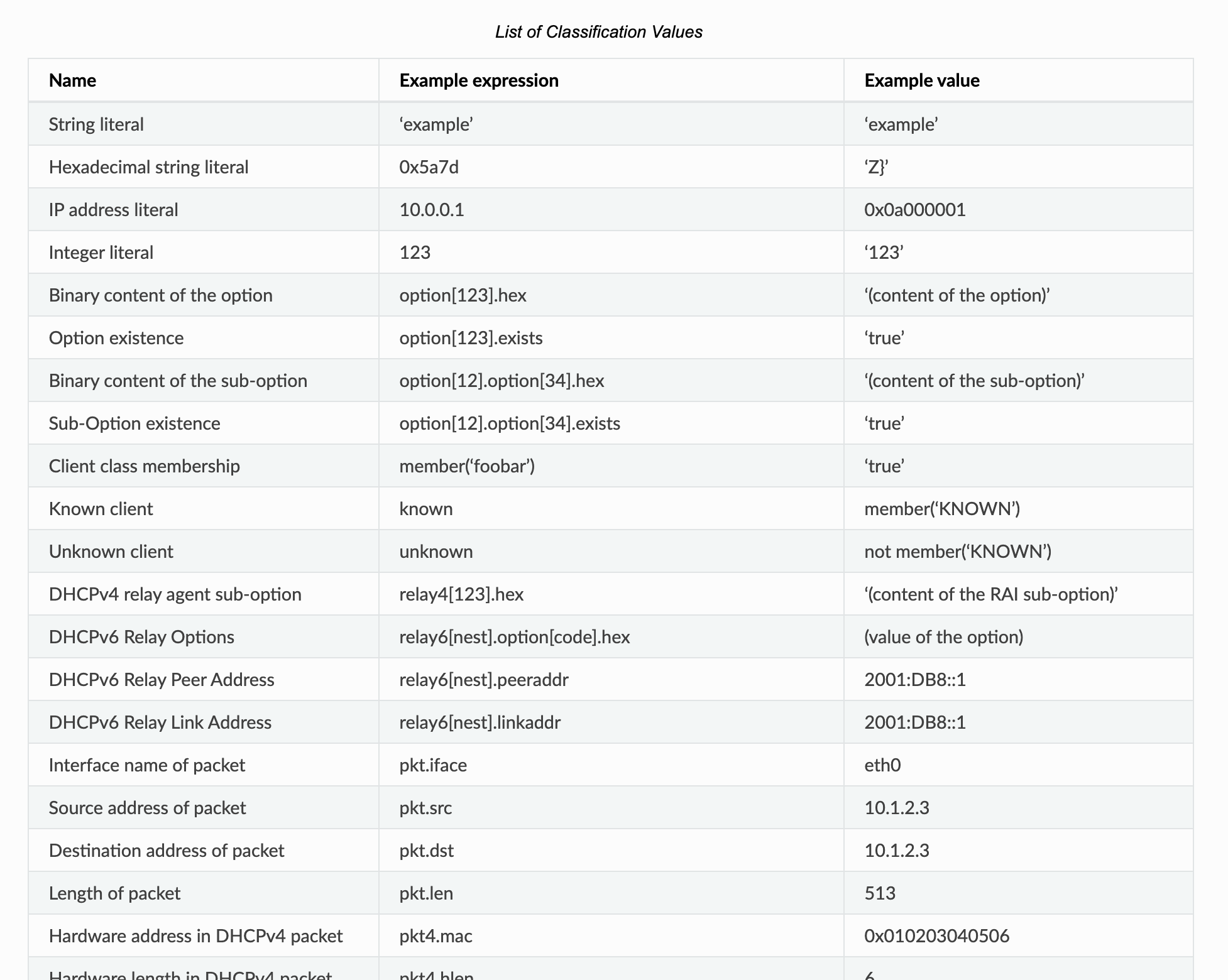
- DHCP requests can be assigned one or more client classes
- Expressions can be used to extract information from the DHCP request message
- Logical and conditional expressions can be used to assign classes to the DHCP request
- List of available expressions https://kea.readthedocs.io/en/latest/arm/classify.html#using-expressions-in-classification@@html:%3C/div%3E@@
Dynamic client classing based on expressions
Client classification example (1/2)
- Configuration for dynamic client classing based on the vendor option (Option 60) content
"Dhcp4": {
   "client-classes": [
        {   "name": "windows",
            "test": "substring(option[60].hex,0,3) == 'win'",
            "option-data": [{
                    "name": "domain-name", "data": "win.example.com" }]
        },
        {   "name": "other",
            "test": "not(substring(option[60].hex,0,3) == 'win')",
            "option-data": [{
                    "name": "domain-name", "data": "other.example.com" }]
        }
    ],
[...]
Client classification example (2/2)
- The client class is used to select a subnet inside a shared network
- Windows clients get IP addresses from the 1st subnet
- Client with other operating systems get IP addresses from the 2nd subnet
  "shared-networks": [
    {
      "name": "kea-lab01",
      "relay": { "ip-address": "192.0.2.1" },
      "subnet4": [
         {
          "subnet": "192.0.2.0/24",
          "client-class": [ "windows" ], # <-- all Windows Clients will
  	                                 # get IP addresses from this subnet
          "option-data": [{ "name": "routers", "data": "192.0.2.1" }],
          "pools": [{ "pool": "192.0.2.60 - 192.0.2.250" } ]
         },
         {
          "subnet": "10.0.0.0/24",
          "client-class": "other", # <-- non Windows Clients will
	                           # get IP addresses from this subnet
          "option-data": [
[...]
Client Classes with regular expressions
- Since Kea-DHCP Version 3.0 client classes can be selected based on regular expressions
- The following client class looks into the OUI-part of the hardware address and tests if they are from Apple Computers range of OUI-Adresses:
"client-classes": [ { "name": "Apple-Computer", "test": "match('5c-1b-f4|a8-5b-b7|58-55-95|00-19-b8',hexstring(substring(pkt4.mac, 0, 3), '-'))" }, [...]- Client-Classing tests run for each incoming DHCP request
- Complex regular expressions can be CPU intensive and can slow down the DHCP server
Classification via hooks
- Client classification via complex expressions can hurt the DHCP server performance
- Alternative: writing a custom hook for client classification
Debugging client classing (1/3)
- To debug client classing based on expressions, enable debug logging inside the Kea DHCP server
- Quick option: start Kea DHCP4 in debug mode from the command
line. This will automatically enable the highest debugging level
- on a busy server, this will create too much debug information (see next slide for an alternative)
[kea-server]# systemctl stop kea-dhcp4
[kea-server]# kea-dhcp4 -d -c /etc/kea/kea-dhcp4.conf
Debugging client classing (2/3)
- Alternative: enable the special
kea-dhcp4.evalorkea-dhcp6.evaldebug logger in the Kea configuration file
"Logging": {
    "loggers": [ {
        "name": "kea-dhcp4.eval",
        "output_options": [ {
            "output": "/var/log/kea-dhcp4-eval.log"
        } ],
        "severity": "DEBUG",
        "debuglevel": 55
    } ]
}
Debugging client classing (3/3)
- Watch for the test evaluation results in the Kea Eval DHCP4 log file
[kea-server]# tail -f /var/log/kea-dhcp4-eval.log
Resources