Kea DHCP
Monitoring and Logging
Carsten Strotmann and the ISC Kea Team
Created: 2025-11-25 Tue 20:22
In this Chapter
- Kea Logging
- DHCP Performance Testing
- Monitoring and troubleshooting tools
Logging
Kea logging configuration
- All Kea services provide flexible logging: https://kea.readthedocs.io/en/latest/arm/logging.html
- Log output can be written to one or more targets
- To syslog
- To a file
- To
stdoutorstderr
Kea logging configuration
- Example: Logging to
stdoutand into a file
    "loggers": [{
        "name": "kea-dhcp4",
        "output_options": [
            {
                "output": "stdout",
                "pattern": "%-5p %m\n"
            },{
                "output": "/var/log/kea/kea-dhcp4.log",
                "maxsize": 1048576,
                "maxver": 10
            }
        ],
        "severity": "INFO",
        "debuglevel": 0
    }]
[...]
Kea Logger
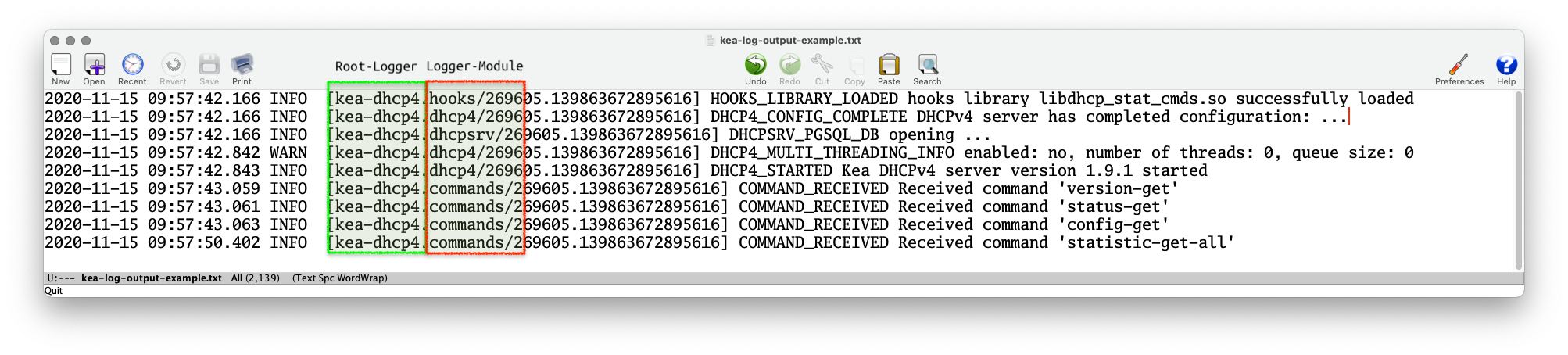
- The Kea Log-Messages are sent from different logging modules
- The logging modules create a logging hierarchy
- The Root-Logger is named after the Kea service process
- Below the Root-Logger are one or more logging modules that can be used to sent specific logging information to other log-targets, or change other logging parameters such as the severity
- The logging modules create a logging hierarchy
- A list of Loggers supported by Kea servers and hook-libraries can be found in the Kea documentation https://kea.readthedocs.io/en/latest/arm/logging.html#the-name-string-logger
Kea Logger
- The name of the logging module that created a log message can be found in the log output (when using the default log pattern for files)
Logging to syslog
- Using the
outputparameter ofsyslogwill sent the log messages of the chosen logger to the syslog daemon- If a different service name should be used for the syslog
messages, the service name can be specified in the format
syslog:name
- If a different service name should be used for the syslog
messages, the service name can be specified in the format
[...]
    "loggers": [{
        "name": "kea-dhcp4",
        "output_options": [
            { "output": "syslog:dhcp4" }
        ],
        "severity": "WARN", "debuglevel": 0
    }]
[...]
Logging to a file
- When logging to a file, the parameter
outputspecifies the file name- File rollover can be specified with the
maxsize(size of log-file in bytes) andmaxver(number of log-file generations)
- File rollover can be specified with the
Logging Message Format
- The content of the log messages can be controlled with the
patternoption- The
patternused for each message is described by a string containing one or more format components as part of a text string - In addition to the components the string may contain any other arbitrary text you find useful.
- The Log4Cplus documentation provides information on the
patternformat string: https://log4cplus.sourceforge.io/
- The
Logging Message Format
- Example: the pattern definition below …
{
   "output": "....",
   "pattern": "%D{%Y-%m-%d %H:%M:%S.%q} %-5p [%c/%i.%t] %m\n"
},
- … will create a log entry similar to this one:
2019-08-05 14:27:45.871 DEBUG [kea-dhcp4.dhcpsrv/8475.12345] DHCPSRV_TIMERMGR_START_TIMER starting timer: reclaim-expired-leases
Kea and Systemd Journal
- When a Kea service is running under control of
systemd, the logging output written tostdoutwill be stored in the systemd journal
[...]
    "loggers": [{
        "name": "kea-dhcp4",
        "output_options": [
            {
                "output": "stdout",
                "pattern": "%-5p %m\n"
            }
        ],
        "severity": "INFO",
        "debuglevel": 0
    }]
[...]
Kea and Systemd Journal
- Systemd-Journal entries can be queried with a filter language
- Easier than filtering through log files (if you don't know
awkandperl) systemd-journalddata can be sent via an encrypted and authenticated connection to a central systemd-journald log host- See the
journalctldocumentation for details
- Easier than filtering through log files (if you don't know
# journalctl --since today -u kea-dhcp4 --grep DHCP4_LEASE_ADVERT
-- Logs begin at Fri 2020-09-18 11:20:45 CEST, end at Sat 2020-11-14 09:24:50 CET. --
Nov 14 00:00:00 home01 kea-dhcp4[244218]: INFO  DHCP4_LEASE_ADVERT [hwtype=1 00:0d:93:29:2d:30], cid=[01:00:0d:93:29:2d:30], tid=0xfa7d9468: lease 192.0.2.114 will be a>
Nov 14 00:00:04 home01 kea-dhcp4[244218]: INFO  DHCP4_LEASE_ADVERT [hwtype=1 00:0d:93:29:2d:30], cid=[01:00:0d:93:29:2d:30], tid=0xe998dcab: lease 192.0.2.114 will be a>
Nov 14 00:05:13 home01 kea-dhcp4[244218]: INFO  DHCP4_LEASE_ADVERT [hwtype=1 2e:78:71:ca:da:26], cid=[no info], tid=0x8ddd0a71: lease 192.0.2.115 will be advertised
Nov 14 02:15:06 home01 kea-dhcp4[244218]: INFO  DHCP4_LEASE_ADVERT [hwtype=1 14:c2:13:ed:ba:fb], cid=[01:14:c2:13:ed:ba:fb], tid=0xda0e88bc: lease 192.0.2.23 will be ad>
Nov 14 04:16:09 home01 kea-dhcp4[244218]: INFO  DHCP4_LEASE_ADVERT [hwtype=1 14:c2:13:ed:ba:fb], cid=[01:14:c2:13:ed:ba:fb], tid=0xda0e88be: lease 192.0.2.23 will be ad>
Nov 14 06:01:03 home01 kea-dhcp4[244218]: INFO  DHCP4_LEASE_ADVERT [hwtype=1 14:c2:13:ed:ba:fb], cid=[01:14:c2:13:ed:ba:fb], tid=0xda0e88c0: lease 192.0.2.23 will be ad>
Nov 14 08:04:24 home01 kea-dhcp4[244218]: INFO  DHCP4_LEASE_ADVERT [hwtype=1 14:c2:13:ed:ba:fb], cid=[01:14:c2:13:ed:ba:fb], tid=0xda0e88c3: lease 192.0.2.23 will be ad>
Kea API authorization logging
- It is possible to restrict the Kea API commands to authorized users
- The authorization information will be logged with the
kea-ctrl-agent.httplogger:
- The authorization information will be logged with the
# ./kea-ctrl-agent -c simple.json
20.10.15 14:05:16.550 INFO  [kea-ctrl-agent.http/174909] HTTP_CLIENT_REQUEST_AUTHORIZED received HTTP request authorized for 'admin'
20.10.15 14:05:16.550 INFO  [kea-ctrl-agent.commands/174909] COMMAND_RECEIVED Received command 'list-commands'
Debug-Logging
- Quick option: start Kea DHCP4 in debug mode from the command
line. This will automatically enable the highest debugging level
- On a busy server, this will create too much debug information (see next slide for an alternative)
[kea-server]# systemctl stop kea-dhcp4
[kea-server]# kea-dhcp4 -d -c /etc/kea/kea-dhcp4.conf
Debug-Logging
- Alternative: enable debug logging on a specific logger only
    "loggers": [{
        "name": "kea-dhcp4",
        "output_options": [
            { "output": "syslog:dhcp4" }
        ],
        "severity": "WARN", "debuglevel": 0
        },{
        "name": "kea-dhcp4.flex-id-hooks",
        "output_options": [ {
            "output": "/var/log/kea/kea-dhcp4-flex-id.log"
        } ],
        "severity": "DEBUG",
        "debuglevel": 55
    } ]
[...]
Other Monitoring
Leases from a memfile
- Mike Miller has created two shell scripts that list the DHCPv4 and DHCPv6 leases from a memfile database
- Homepage: https://archive.mgm51.com/sources/kea-scripts.html
% kea-show-leases4.sh
IPAddr          HWAddr              Lease Start           Renew           Expire          Hostname  State
10.20.2.7       z0:z1:d9:z5:7c:36   14400 20150905T113158 20150905T133158 20150905T153158 host1.    0
10.20.2.6       0z:1z:d9:z5:7c:35   14400 20150905T112931 20150905T132931 20150905T152931 .         0
10.20.2.234     zz:75:0z:1a:a0:98   14400 20150905T112029 20150905T132029 20150905T152029 .         0
172.20.2.222    az:z3:cz:c4:4b:00   14400 20150905T110758 20150905T130758 20150905T150758 .         0
Leases from a SQL database
- The presenter of this webinar has created a simple python3 script that lists the leases from a PostgreSQL Kea lease database
- Source: https://git.sr.ht/~cstrotm/kea-list-leases
% kea-list-leases.py
DHCPv4 leases:  6
IP Address   | Hostname        | HW Addr           | Client-ID            | Subnet ID | lifetime | expire
192.0.2.23   | macbookair      | 14:c2:33:fd:ba:fb | 01:14:c2:33:fd:ba:fb | 1         | 14400    | 2020-11-18T14:11:17+01:00
192.0.2.80   | phone           | 00:02:13:55:5e:23 |                      | 1         | 14400    | 2020-11-18T14:33:32+01:00
192.0.2.120  | linux-fedora    | 3c:09:14:7a:6a:67 | 01:3c:09:14:7a:6a:67 | 1         | 14400    | 2020-11-18T13:24:08+01:00
192.0.2.121  |                 | 80:47:23:e6:38:32 |                      | 1         | 14400    | 2020-11-18T14:48:28+01:00
192.0.2.122  | openbsd         | a8:61:b6:d1:ee:6e | 01:a8:61:b6:d1:ee:6e | 1         | 14400    | 2020-11-18T14:48:42+01:00
192.0.2.242  | nas             | 00:12:47:30:c4:de | 01:00:12:47:30:b4:de | 1         | 14400    | 2020-11-18T14:47:31+01:00
Process Monitoring - systemd
- On a Linux machine with
systemd, the status of the Kea processes can by read from the systemd process
# systemctl status kea-dhcp6
● kea-dhcp6.service - Kea DHCPv6 Service
     Loaded: loaded (/etc/systemd/system/kea-dhcp6.service; enabled; vendor preset: disabled)
     Active: active (running) since Thu 2020-11-12 22:50:14 CET; 1 day 10h ago
       Docs: man:kea-dhcp6(8)
   Main PID: 244200 (kea-dhcp6)
      Tasks: 1 (limit: 11784)
     Memory: 5.6M
        CPU: 22.572s
     CGroup: /system.slice/kea-dhcp6.service
             └─244200 /opt/kea/sbin/kea-dhcp6 -c /opt/kea/etc/kea/kea-dhcp6.conf

Nov 12 22:50:14 home01 systemd[1]: Started Kea DHCPv6 Service.
Nov 12 22:50:14 home01 kea-dhcp6[244200]: 2020-11-12 22:50:14.813 INFO  [kea-dhcp6.dhcp6/244200.140267216668800] DHCP6_STARTING Kea DHCPv6 server version 1.9.1 (developm>
Nov 12 22:50:14 home01 kea-dhcp6[244200]: 2020-11-12 22:50:14.813 WARN  [kea-dhcp6.dhcp6/244200.140267216668800] DHCP6_DEVELOPMENT_VERSION This software is a development>
Process Monitoring via Systemd API
systemdexposes the state of managed services via the DBUS API- a monitoring system can read the DBUS API information
- Example: Monitoring systemd services in realtime with Chronograf https://devconnected.com/monitoring-systemd-services-in-realtime-with-chronograf/
- Example: Prometheus exporter for
systemdservices https://github.com/povilasv/systemd_exporter
Monitoring via Kea API
- Every Kea process exposes a REST/JSON API
- This API can be used to monitor the health and function of the Kea
services (independent from Stork)
- Python Kea exporter for Prometheus https://pypi.org/project/kea-exporter/
- Source code of the Prometheus Kea exporter: https://github.com/mweinelt/kea-exporter
DHCP Function Monitoring
dhcpingis a simple tool to test if a DHCP server responds to DHCP requests and returns a lease- it requests a lease (DHCPREQUEST) or DHCP option information (DHCPINFORM) from a DHCP Server
- after obtaining a lease, it will release the lease immediately
- Original Homepage: http://www.mavetju.org/unix/general.php
- Updated source: https://github.com/nean-and-i/dhcping
DHCping (1/3)
% sudo ./dhcping -v -s 192.0.2.1 -h 01:02:03:04:05:05 -c 192.0.2.145

---------------------------------------------------------------------------

DHCP REQUEST
packet 250 bytes

nop: 1
htype: 1
hlen: 6
hops: 0
xid: ef0aaf5f
secs: 0
flags: 0
ciaddr: 192.0.2.145
yiaddr: 0.0.0.0
siaddr: 0.0.0.0
giaddr: 0.0.0.0
chaddr: 01:02:03:04:05:05
sname :
fname :
option 53 DHCP message type
	DHCP message type: 3 (DHCPREQUEST)
option 50 Request IP address
	Requested IP address: 192.0.2.145
DHCping (2/3)
Got answer from: 192.0.2.1
packet 300 bytes

nop: 2
htype: 1
hlen: 6
hops: 0
xid: ef0aaf5f
secs: 0
flags: 7f80
ciaddr: no entry found
yiaddr: 0.0.0.0
siaddr: 0.0.0.0
giaddr: 0.0.0.0
chaddr: 01:02:03:04:05:05
sname :
fname :
option 53 DHCP message type
	DHCP message type: 6 (DHCPNAK)
option 54 DHCP Server identifier
	Server identifier: 192.0.2.1
option 56 Message
DHCping (3/3)
DHCP RELEASE
packet 250 bytes

nop: 1
htype: 1
hlen: 6
hops: 0
xid: ef0aaf5f
secs: 0
flags: 0
ciaddr: 192.0.2.145
yiaddr: 0.0.0.0
siaddr: 0.0.0.0
giaddr: 0.0.0.0
chaddr: 01:02:03:04:05:05
sname :
fname :
option 53 DHCP message type
	DHCP message type: 7 (DHCPRELEASE)
option 54 DHCP Server identifier
	Server identifier: 192.0.2.1
DHCPtest
- DHCPtest is another DHCP test tool
- Written in the computer language
D - Source: https://github.com/CyberShadow/dhcptest
- Written in the computer language
% ./dhcptest --query
dhcptest v0.7 - Created by Vladimir Panteleev
https://github.com/CyberShadow/dhcptest
Run with --help for a list of command-line options.

Listening for DHCP replies on port 68.
Sending packet:
  op=BOOTREQUEST chaddr=2E:78:71:CA:DA:26 hops=0 xid=8DDD0A71 secs=0 flags=8000
  ciaddr=0.0.0.0 yiaddr=0.0.0.0 siaddr=0.0.0.0 giaddr=0.0.0.0 sname= file=
  1 options:
     53 (DHCP Message Type): discover
Received packet from 192.0.2.8:67:
  op=BOOTREPLY chaddr=2E:78:71:CA:DA:26 hops=0 xid=8DDD0A71 secs=0 flags=8000
  ciaddr=0.0.0.0 yiaddr=192.0.2.115 siaddr=0.0.0.0 giaddr=0.0.0.0 sname= file=
  9 options:
  53 (DHCP Message Type): offer
      1 (Subnet Mask): 255.255.255.0
      3 (Router Option): 192.0.2.1
      6 (Domain Name Server Option): 192.0.2.8, 172.16.1.105
     15 (Domain Name): home.example.com
     51 (IP Address Lease Time): 14400 (4 hours)
     54 (Server Identifier): 192.0.2.8
     58 (Renewal (T1) Time Value): 3600 (1 hour)
     59 (Rebinding (T2) Time Value): 7200 (2 hours)
Monitoring for Pool depletion
- Performance suffers at very high pool utilization, because Kea is checking every address in order to see if it is available
- If an DHCP pool runs full, there is a risk that DHCP clients will not get an IP address lease and cannot join the network
How to deal with pool depletion
- If you encounter address pool depletion, check for the reasons
- Lease time too high for the number of DHCP clients in the network
- Machines are not releasing their lease on shutdown
- Malicious/buggy DHCP client software
Countermeasures to address pool depletion
- Configure the Microsoft DHCP clients to release their leases on shutdown
- Can be done via DHCP option: https://docs.microsoft.com/en-us/openspecs/windows_protocols/ms-dhcpe/4cde5ceb-4fc1-4f9a-82e9-13f6b38d930c
- Useful in public places where clients are not coming back
- consider switching to IPv6
- Make the pool as large as the current Internet ;)